IT Service Management (ITSM)
Powered By

Title
Message
Create new category
What is the title of your new category?
Edit page index title
What is the title of the page index?
Edit category
What is the new title of your category?
Edit link
What is the new title and URL of your link?
Interacting with Problem Management
Copy Markdown
Open in ChatGPT
Open in Claude
Create Problem
Navigate to ITSM > Problem Management in the left navigator.
Click on the button on the top ribbon of the view.
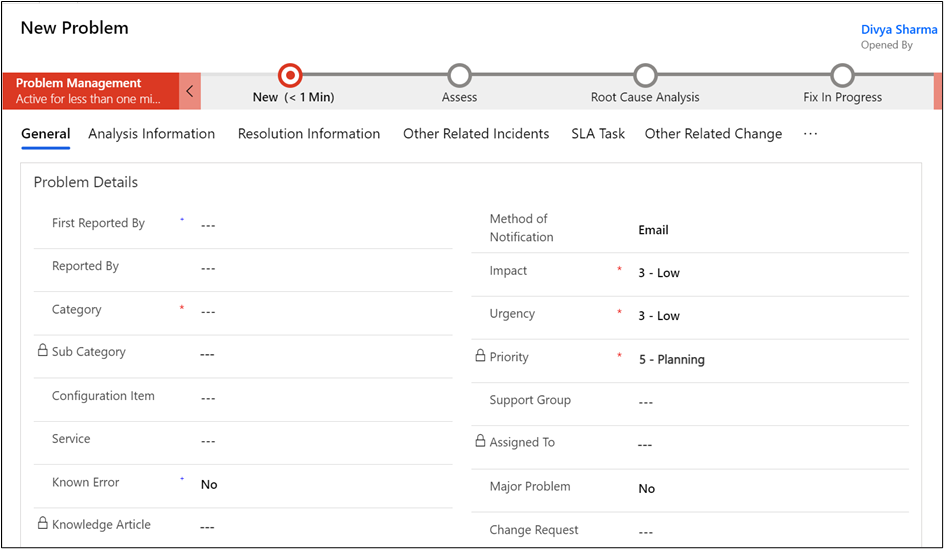
The new problem form will open.
Category, Impact, Urgency, Problem Statement, Description.
Opened By, Impact, Urgency, Priority.

Click on the button on the top ribbon.
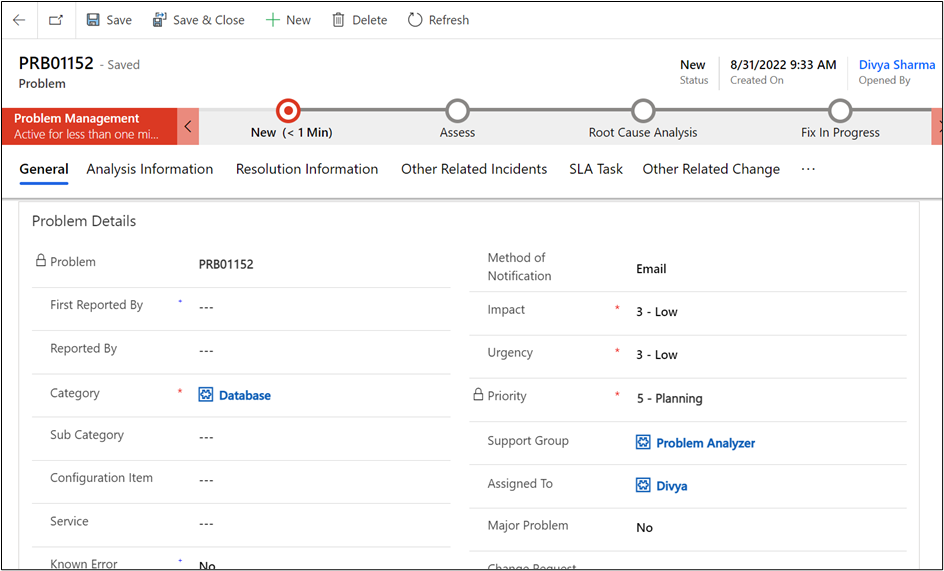
On successful submission, you will be redirected to the screen where your Problem Number is generated automatically, Created On date is captured along with the details of Problem provided.
VariableType to search · ESC to discard
GlossaryType to search · ESC to discard
InsertType to search · ESC to discard
No matches
Last updated on
Was this page helpful?
Next to read:
The life cycle of a Problem© Copyright 2023 EXM Cloud. All rights reserved.
Discard Changes
Do you want to discard your current changes and overwrite with the template?
Archive Synced Block
Message
Create new Template
What is this template's title?
Delete Template
Message