
The SLA Master Table is the central repository within an organization's IT Service Management (ITSM) system where Service Level Agreements (SLAs) are managed and stored. It contains crucial information about each SLA, providing a comprehensive overview of the service commitments made to customers.
In the SLA Master table, you have the option to create Service Level Agreement (SLA) master records. These records are then utilized to generate an SLA record. Within this table, you can specify exclusions for weekends and holidays. Additionally, you can configure notifications to be sent out at 25%, 50%, and 75% completion thresholds. This functionality allows for efficient control over these aspects within the SLA master table.
Create SLA Master Record
Navigate to SLA Master section Administration > SLA Master.
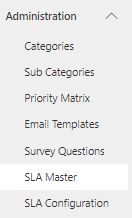
Click on the New button. The SLA Master form is displayed. On the form, fill in the fields.
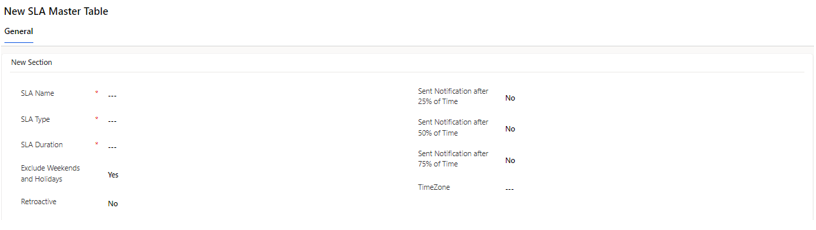
Field | Description |
|---|---|
SLA Name | Name that identifies the SLA |
SLA Type | Specifies the type or category of the SLA(Response, Resolution) |
SLA Duration | Specifies the duration of the SLA in hours. It defines the timeframe within which the defined service level objectives must be met |
Exclude Weekends and Holidays | Indicates whether weekends and public holidays are excluded from the SLA duration when calculating times. |
Retroactive | Specify the SLA Start time of SLA Calculation. |
Send Notification after 25% of Time | Sets whether notifications should be sent when 25% of the SLA duration has elapsed. |
Send Notification after 50% of Time | Similar to the above, but for when 50% of the SLA duration has passed. |
Send Notification after 75% of Time | Again, similar to the above, but for when 75% of the SLA duration has elapsed. |
Time Zone | Specifies the time zone used for calculating SLA deadlines and sending notifications. |
Types of SLA
Response SLA: Specifies the timeframe within which a response to an issue must be provided.
Resolution SLA: Specifies the duration within which an issue must be resolved.
Excluding Weekends and Holidays:
In the context of SLAs, "Exclude Weekends and Holidays" refers to the option to omit weekends and public holidays from SLA calculations. When this option is enabled, the system automatically adjusts the SLA duration to exclude non-working days. The list of holidays is defined in the Holiday Table within the system, ensuring accurate exclusion of holidays from SLA calculations.
Ensure that the list of holidays defined in the Holiday Table is regularly updated to accurately exclude holidays from SLA calculations, maintaining fairness and accuracy in SLA commitments.
Retroactive
Retroactive is a feature in the SLA Master Table that determines how the calculation of an SLA's timeframe should begin. This setting is crucial for accurately measuring the duration of an SLA in relation to when an issue was initially created or last modified.
If Retroactive is set to "Yes," the SLA calculation starts based on the time when the issue was created. This means that the countdown for meeting the SLA objectives begins from the moment the issue is logged.
If Retroactive is set to "No," the SLA calculation starts based on the time when the issue was last modified.
Notification Configuration
Configure notification settings appropriately to keep stakeholders informed of SLA progress and ensure timely escalation of issues when necessary.
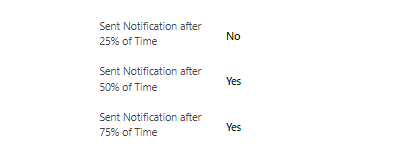
Managers receive an email notification when SLAs reach 75% and breach.
Notifications related to SLAs are configured based on the settings provided in the SLA Master Table, determining when reminders or alerts should be sent based on predefined milestones within the SLA duration.
The SLA Master Table is a critical component of ITSM, providing a centralized location for managing SLAs and ensuring that service commitments are effectively monitored and enforced.
