
"Life events" are defined as significant events in an employee's personal or professional life that have the potential to impact their relationship with their place of employment. These occasions may be crucial turning points that call for cautious handling to guarantee that workers get the support, knowledge, and benefit modifications they require. Changes in marital status (marriage or divorce), family additions or modifications (childbirth, changing dependents), name changes, medical events, relocations, retirements, taking up new hobbies, changing jobs, leaves of absence, and benefit enrollment or adjustments are examples of common life events in HR service delivery.
Navigate to Life Events.
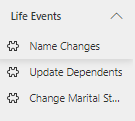
Name Change
Navigate to Life Events > Name Changes.
Name Change: An employee's decision to change their name requires a thorough updating of their personal data. HR is responsible for making sure that the name change appears correctly in all official records, such as identity papers, payroll records, and benefit records. This life event is essential to preserving legal compliance and guaranteeing that the worker is appropriately acknowledged inside the company.
When a user creates a name change request from portal, a workflow is triggered.
The system checks the "Workflow Configuration" table to find the process details for the name change.
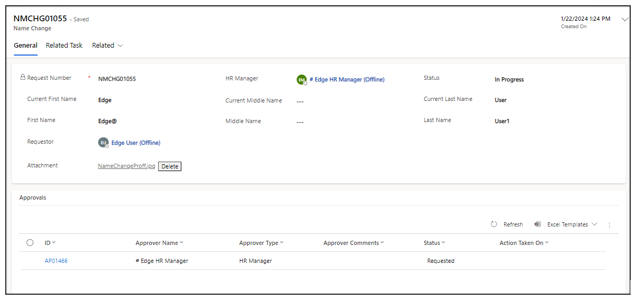
General Tab
Fields | Description |
|---|---|
Request Number | A unique identifier for each name change request, usually generated sequentially to track and manage individual requests. |
Manager | The name employee's manager, responsible for authorizing or approving the name change request. |
Status | The current status of the name change request. |
Current First Name | The employee's existing or current first name before the requested change. |
Current Middle Name | The employee's existing or current middle name, if applicable, before the requested change. |
Current Last Name | The employee's existing or current last name before the requested change. |
First Name | The new or requested first name that the employee wants to use after the change. |
Middle Name | The new or requested middle name, if applicable, that the employee wants to use after the change |
Last Name | The new or requested last name that the employee wants to use after the change. |
Requestor | The employee or individual making the name change request. |
Attachment | A field that allows the attachment of supporting documentation or evidence for the name change request. This may include legal documents like marriage certificates or court orders, depending on the reason for the name change. |
Approval Tab
It is designed to capture the information related to the approval process associated with the Name Change request.

Fields | Description |
|---|---|
ID | Serves as a primary key, allowing for the unique identification of each approver record |
Approver Name | The name of the user who received the approval request |
Approver Type | Describes the category or type of the approver, such as a person, HR manager, or a designated group. |
Approver Comments | A field reserved for any additional comments or notes provided by the approver. |
Status | Indicates the current status of the approval, such as "Requested," "Approved," or "Rejected." |
Action Taken On | Records the date and time when the approver took action (approved or rejected). |
Task Tab
The Task tab is specifically designated to record details pertaining to tasks associated with the Name Change process.
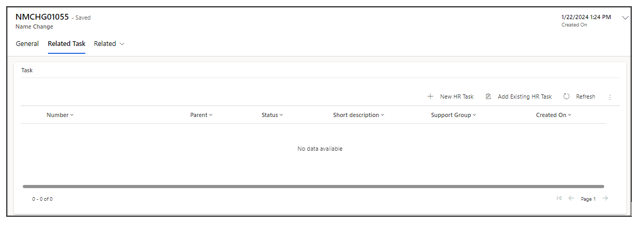
Fields | Description |
|---|---|
Number | A unique identifier or reference number assigned to each task. |
Parent | A polymorphic field that dynamically looks up to various tables (e.g., Name Change, Marital Status) to establish a link between tasks and specific life events or processes. |
Status | Describes the current state of the task |
Short Description | A concise and brief description of the task. |
Created On | Indicates the date and time when the task was created. |
Update Dependent
Update Dependent: It refers to making changes to the information related to an employee's dependents, such as their spouse, children, or other individuals who rely on the employee for benefits or coverage. This can involve adding new dependents, modifying existing dependent information, or removing dependents from an employee's record. These updates are often necessary during life events like marriage, divorce, the birth of a child, or other changes in dependent status
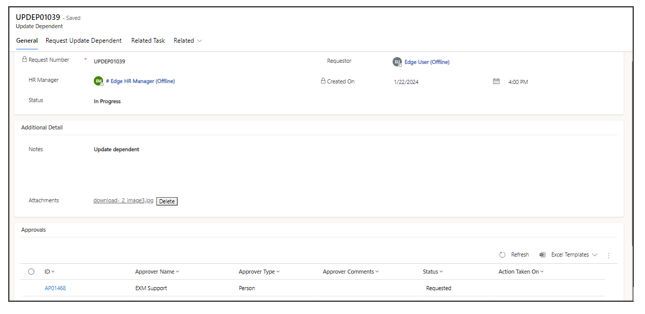
General Tab
Fields | Description |
|---|---|
Request Number | A unique identifier assigned to each update request for tracking and reference purposes. |
Requestor | The person who initiates the request to update dependent information. |
Manager | The manager responsible for approving or overseeing the requested update. |
Status | The current status of the update request. |
Created On | The date and time when the update request was originally submitted. |
Notes | A field for adding comments, explanations, or additional information related to the update request. This can be used for providing context or clarifications. |
Attachments | Where relevant documents or supporting materials, such as marriage certificates, birth certificates, or other documentation, can be attached to support the dependent update request. |
Approval Tab
It is designed to capture the information related to the approval process associated with the Name Change request.
Task Tab
The Task tab is specifically designated to record details pertaining to tasks associated with the Name Change process.
Request Update Dependent
Request Update Dependent: This table are commonly used in HR management to keep track of individuals such as spouses, children, or parents who rely on an employee for benefits, insurance coverage, or other related services. It allows for the management of dependent records, indicating the name of the dependent, their relation to the employee, the type of action (add, update, or delete).
Type: This field specifies the type of change or action to be taken for the dependent. It can be one of the following:
Add: Indicates that a new dependent is being added to the employee's records.
Update: Indicates that there is a change or modification to an existing dependent's information.
Delete: Indicates that a dependent is to be removed or deleted from the employee's records.
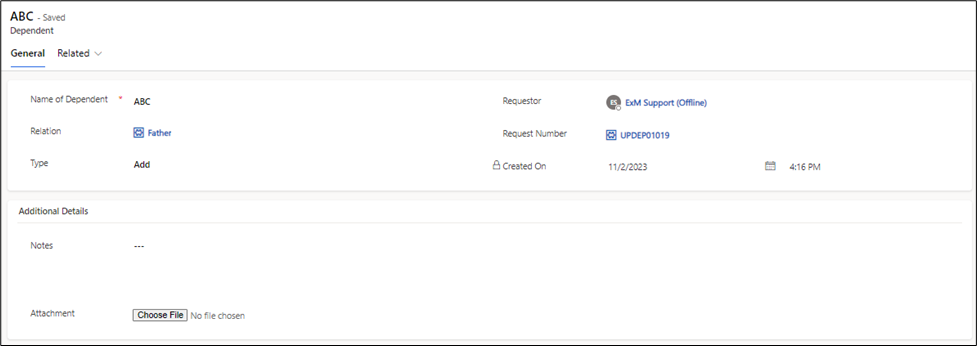
Fields | Description |
|---|---|
Name Of Dependent | The full name of the dependent, which can include first name, last name, and any middle names. |
Relation | The relationship between the employee and the dependent, indicating whether the dependent is a spouse, child, parent, or another relevant relation. |
Type | This field specifies the type of change or action to be taken for the dependent (Add, Update and Delete). |
Requestor | The individual who initiates the request. |
Request Number | A unique identifier assigned to each request for tracking and reference purposes |
Created On | The date and time when the request to add, update, or delete |
Notes | This can be used for providing context, reasons for the change, or any other relevant notes. |
Attachment | Where relevant documents or supporting materials can be attached. This is particularly important for documenting changes, such as providing necessary documentation for adding or updating a dependent's information. |
Change Marital Status
Change Marital Status: A "change in marital status" refers to a significant life event or transition in an individual's personal life that involves a change in their legal or social relationship status regarding marriage
General Tab
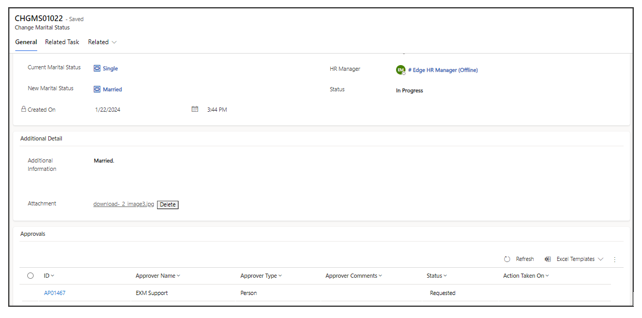
Fields | Description |
|---|---|
Request Number | A unique identifier assigned to each change request, enabling tracking and reference. |
Current Marital Status | The employee's marital status before the change. |
New Marital Status | The updated marital status after the change. |
Created On | The date and time when the change request was initiated. |
Requestor | The individual who initiates the request for the change. |
Manager | The manager responsible for approving or overseeing the requested change |
Status | The current status of the change request |
Additional Information | A field for adding comments, explanations, or other details related to the change request, providing context or reasons for the change. |
Attachment | A field for attaching relevant documents, such as marriage certificates, divorce decrees, or any other supporting materials that validate and support the change in marital status. |
Approval Tab
It is designed to capture the information related to the approval process associated with the Name Change request.
Task Tab
The Task tab is specifically designated to record details pertaining to tasks associated with the Name Change process.
Workflow Configuration
A "workflow configuration" table is a database table within an application that stores information outlining the specific details and steps of a workflow or process. This table serves as a centralized repository for configuring and customizing the execution of various activities or tasks associated with different processes
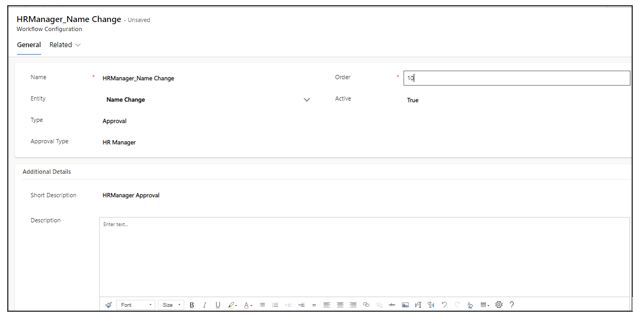
If two or more tasks within the workflow share the same order number, it implies that these tasks are intended to be executed simultaneously or in parallel.
Fields | Description |
|---|---|
Name | A unique identifier or label for the workflow, often concatenated with the "entity" field, providing clarity on the purpose of the configuration (e.g., "Name_Entity"). |
Entity | Specifies the type of life event or process associated with the workflow (e.g., name change, update dependent, change marital status). |
Type | Categorizes the task as either a regular task or an approval process. |
Approval Type | Identifies who needs to approve the task or process, whether it's an individual, an HR Manager, or a designated group. |
Order | Defines the sequence or order of steps to be executed within the workflow, ensuring a structured and organized flow of activities. |
Active | Specifies whether the process is active or inactive. |
Support Group | Indicates the group that should be notified and involved when the workflow involves a task. |
Short Description | Provides an explanation and nature of the workflow. |
Description | Provides a more detailed description of the workflow, offering additional context or information for better understanding. |
Life Event Approval Process
When an approval step is part of a life event process. The system checks the Workflow Configuration Table to understand how the approval process for that specific life event is configured.
Action: Based on the configuration in the Workflow Configuration Table, the system determines who the approver(s) are for the specific life event.
Approvers: Approvers can be individuals (person), HR managers, or designated groups, depending on the configuration.
Teams Approval notification.
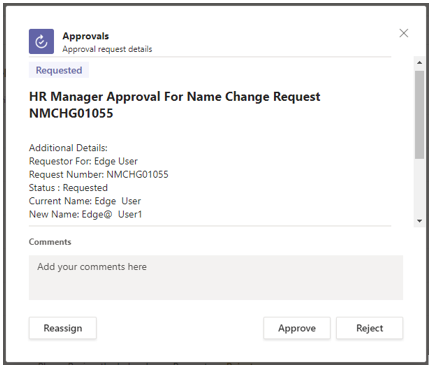
Outlook Approval Notification
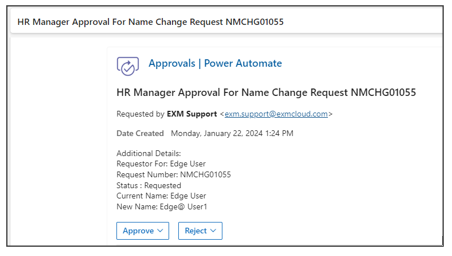
In a similar way, for other approval scenarios (e.g., approval by a designated group or a specific person), the Workflow Configuration Table would define the approver type accordingly. The system would then send notifications to the respective approver(s) and the relevant team responsible for overseeing the life event process. This ensures a streamlined and organized approach to handling approvals for various life events within the application.
