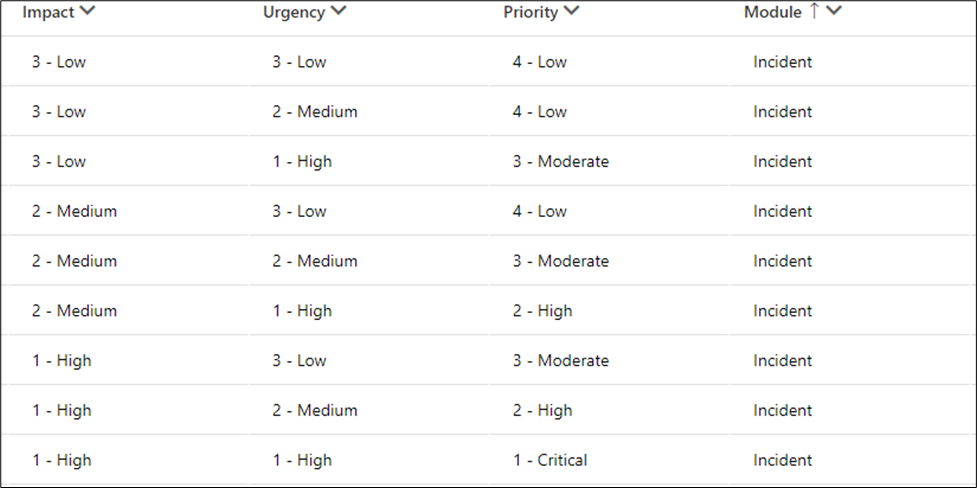
An incident's priority can be established by weighing its impact and urgency. Based on the results of this calculation, a schedule is prioritized, and SLAs can be set accordingly.
Navigate to the Priority Matrix and click on
 New Button.
The Priority Matrix Priority form is displayed. On the form, fill in the Impact, Urgency and Priority field then click on save.
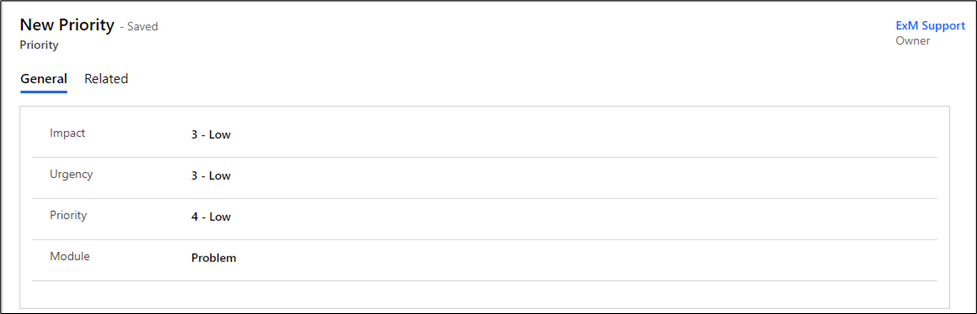
The fields description defined as follows:
Fields | Description |
|---|---|
Impact | Impact is a term used to describe how an occurrence, issue, or change affects business operations. |
Urgency | The degree of urgency refers to how long a problem, incident, or change can be ignored before it significantly affects the company's operations. |
Priority | Priority determines how quickly the service desk should do the assignment depending on impact and urgency. |
Module | Module define the table where the Priority matrix take place |
Priority is calculated according to the following sample data lookup rules. By default, the Priority field is read-only and must be set by selecting the Impact and Urgency values.