
Any number of SLA Masters can be used to document a service level agreement. This SLA document can be used as a starting point for implementing an SLA system within your organization's assigned tasks. A SLA Master record defines the deadlines, type, alerting, and other parameters needed to build and progress task SLAs.
Navigate to SLA Master Tables from the left menu.
Click
 New button. The SLA Master form is displayed.
On the Form, fill in the fields
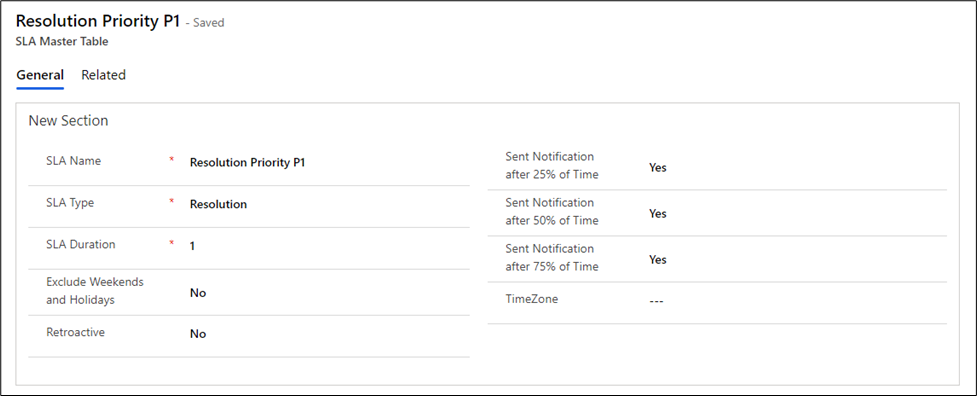
SLA Master Form Details
Fields | Description |
|---|---|
SLA Name | Name used to reference the SLA Master definition. |
SLA Type | Pick one of the following as the SLA Type: Response, or Resolution. |
SLA Duration | Indicate how long the SLA lasts before being marked. Breached |
Exclude Weekends and Holidays | Set "yes" to Exclude Weekends and Holidays from the SLA Calculation. Otherwise Set to "No". |
Retroactive | Set "No" to start the SLA from Incident Modified time and set to "Yes" to start the SLA from start time of Incident. |
Sent Notification after 25% of Time | To send the Reminder for 25% of SLA set to Yes. |
Sent Notification after 50% of Time | To send the Reminder for 50% of SLA set to Yes. |
Sent Notification after 75% of Time | To send the Reminder for 75% of SLA set to Yes. |
TimeZone | When establishing task SLAs, specify the source time zone, By default its User login time zone |
