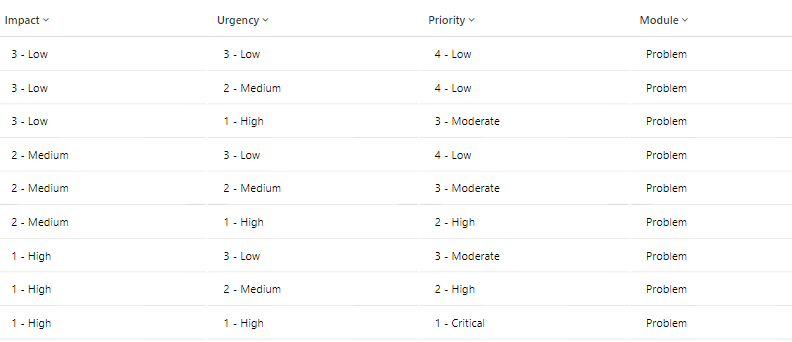
A priority can be established by weighing its impact and urgency. Based on the results of this calculation, a schedule is prioritized, and SLAs can be set accordingly.
Navigate to Administration > Priority Matrix.
Click on
 Button.
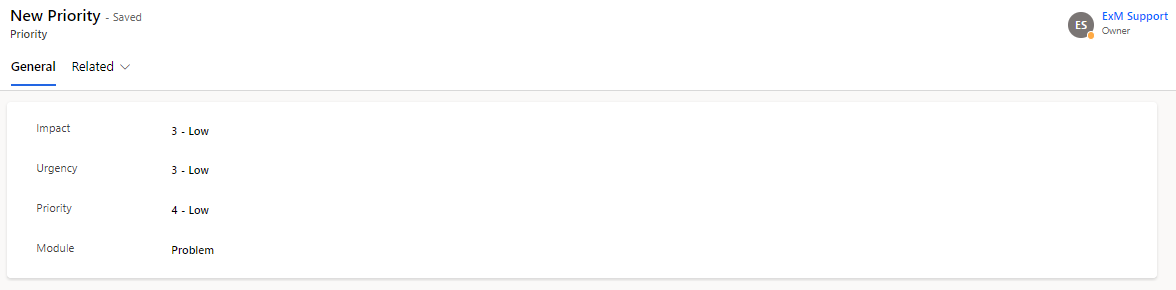
The Priority Matrix Priority form is displayed.
On the form, fill in the fields and then click on Save.
Field | Description |
|---|---|
Impact | Impact is a term used to describe how an occurrence, issue, or change affects business operations. |
Urgency | The degree of urgency refers to how long a problem, incident, or change can be ignored before it significantly affects the company's operations. |
Priority | Priority determines how quickly the service desk should do the assignment depending on impact and urgency. |
Module | Module define the table where the Priority matrix take place |
Priority is calculated according to the following Sample data lookup rules. By default, the Priority field is read-only and must be set by selecting the Impact and Urgency values.