
This includes details on the names of the companies, their contact information, business address, phone number, E-Mail address and other relevant contact information.
To create record in companies
Navigate to Foundation Data > Companies.
Select New.
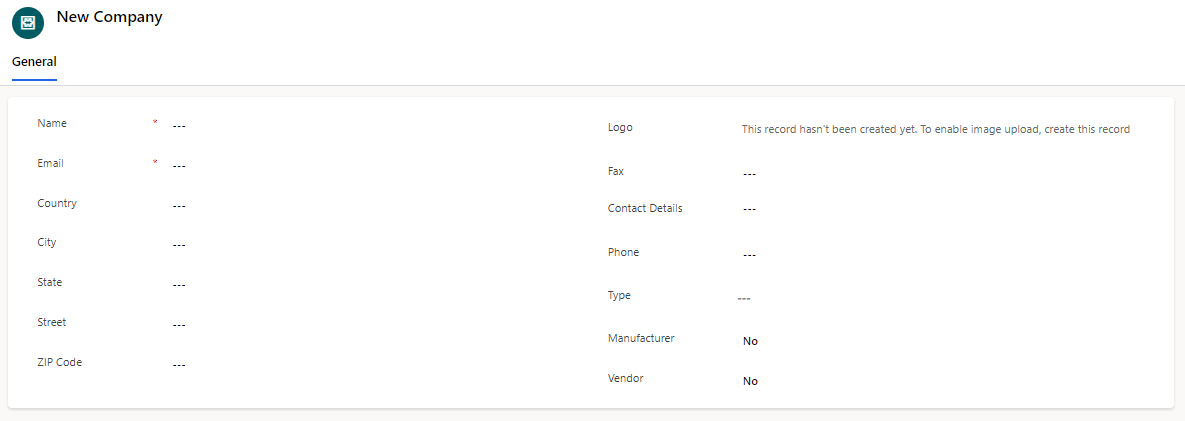
Field | Description |
|---|---|
City | The city where the company is situated. |
Contact Details | The name of the primary contact person or representative for the company. |
Country | The country where the company is located |
The email address of the primary contact person or representative | |
Fax | The fax number associated with the company, if applicable |
Logo | A visual representation or logo associated with the company |
Manufacturer | Indicates if the company is a manufacturer involved in the project |
Name | The name or title of the company |
Phone | The phone number of the primary contact person or representative |
State | The state or province where the company is located, if applicable. |
Street | The street address or location of the company. |
Type | The categorization or type of the company (Vendor, Partner, Customer). |
Vendor | Indicates if the company is a vendor or supplier for the project. |
ZIP Code | The ZIP or postal code of the company's location |
