
A user form in HRSD (Human Resources Service Delivery) is a digital tool used to collect essential information from employees or applicants. It typically includes fields for personal details, contact information, employment history, and possibly emergency contacts or legal documentation. User forms streamline data collection, ensuring accuracy and compliance with organizational policies. They facilitate the onboarding process by centralizing information and expediting administrative tasks. HR departments use user forms to efficiently manage personnel records and provide better support to employees throughout their journey within the organization.
As per the onboarding procedure, if the candidate meets the qualification criteria, they will be advanced to a member status in the AD (Active Directory) and included in the user table two days ahead of their joining date. Additionally, any associated documents will be gathered and stored within the user entity.
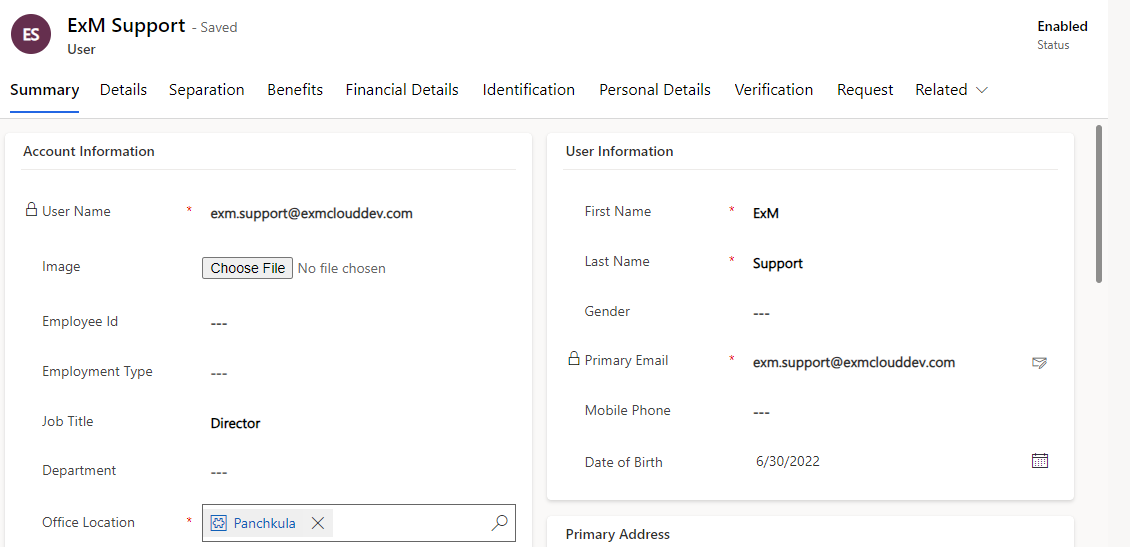
Summary
The summary consolidates crucial details related to an individual's account, personal information, emergency contacts, addresses, and assigned licenses:
Account Information
User Account Information includes essential details for user identification and management.
These details collectively provide a comprehensive overview of the user's identity, role, and organizational context, facilitating effective management of user accounts and access privileges.
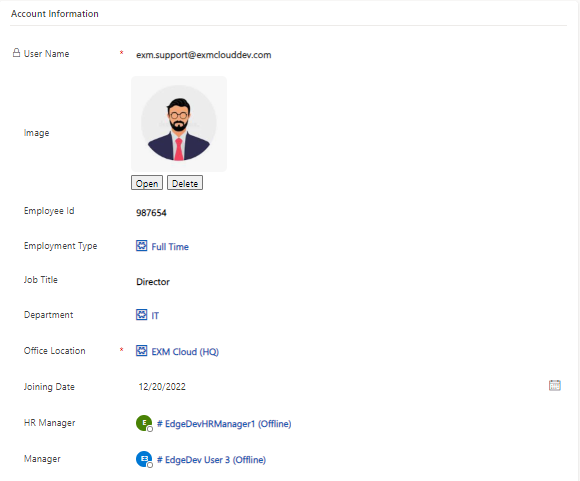
Field | Description |
|---|---|
User Name | The unique identifier used by the user to log in to systems or platforms. |
Image | A profile picture or avatar associated with the user's account, often used for visual identification. |
Employee Id | A unique numerical or alphanumeric identifier assigned to each employee within the organization. |
Employment Type | Specifies the type of user account, such as employee, contractor, or administrator. |
Job Title | The job title or position held by the user within the organization. |
Department | The specific department or division to which the user belongs within the organization. |
Office Location | Physical location where the user primarily works. |
HR Manager | Name or identifier of the user's HR manager. |
Manager | Name or identifier of the user's immediate supervisor or manager. |
Marital Status | Status indicating whether the user is single, married, etc. |
User Information
User Information encompasses vital personal details for identification and communication.
Collecting and managing this information ensures accurate user identification, facilitates communication, and enables personalized services within the organization's systems and platforms.
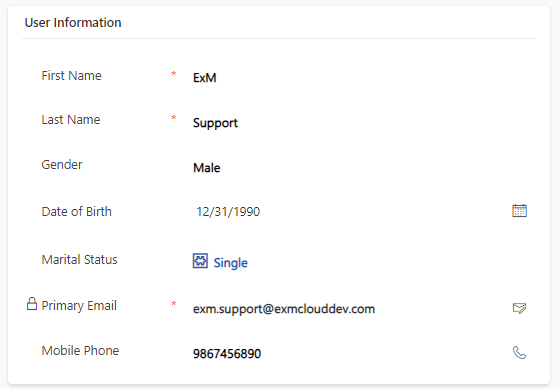
Field | Description |
|---|---|
First Name | The given name of the user. |
Last Name | The surname or family name of the user. |
Gender | The gender identity of the user, if provided. |
Primary Email | The main email address associated with the user's account for communication and authentication purposes. |
Mobile Phone | The user's mobile phone number, often used for two-factor authentication and communication. |
Date of Birth | The birth date of the user, providing age-related information and sometimes used for verification purposes. |
Emergency Details
Emergency Details capture critical information for contacting a user's emergency contact.
These details enable quick and efficient communication with the designated individual in case of emergencies, ensuring the safety and well-being of the user.
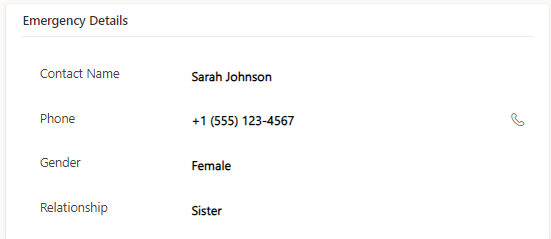
Field | Description |
|---|---|
Contact Name | Name of the designated emergency contact person. |
Phone | Phone number of the emergency contact for immediate communication. |
Gender | Gender identity of the emergency contact, if relevant. |
Relationship | Relationship of the emergency contact to the user (e.g., spouse, parent, sibling). |
Primary Address
Primary Address details the user's main residence or contact address.
Collecting this information ensures accurate correspondence and location-specific communication with the user, as well as facilitating logistical arrangements as needed.
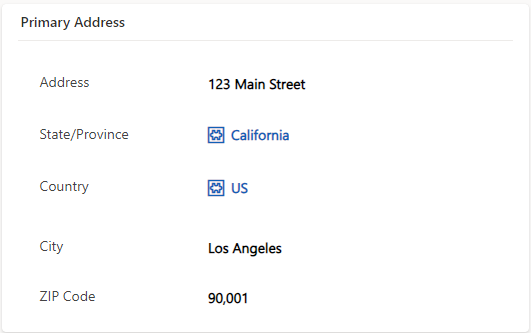
Field | Description |
|---|---|
Address | Street address, including building or apartment number. |
State/Province | Administrative region within the country (if applicable). |
Country | Nation where the user's primary address is located. |
City | Municipality or urban area associated with the address. |
ZIP Code | Postal code or ZIP code corresponding to the area. |
Secondary Address
Secondary Address provides an additional location for the user.
This information facilitates communication and logistical arrangements for users who may have multiple residences or work locations.
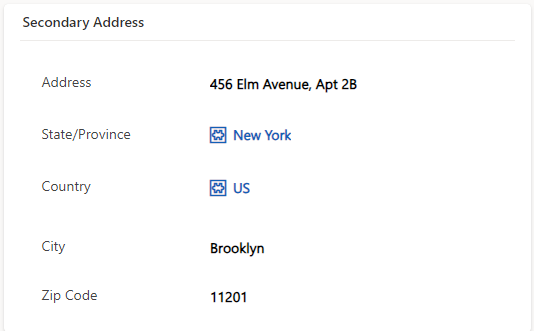
Field | Description |
|---|---|
Address | Detailed street address, including any relevant identifiers. |
State/Province | Administrative division within the country, if applicable. |
Country | Nation where the secondary address is located. |
City | Urban or municipal area associated with the address. |
ZIP Code | Postal or ZIP code corresponding to the secondary location. |
Assigned Licenses
Assigned Licenses detail the software or service licenses assigned to a user.
This information helps manage software/service subscriptions and ensure users have access to the necessary tools for their roles within the organization.
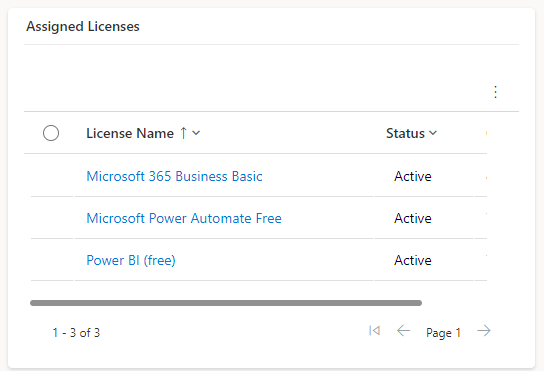
Field | Description |
|---|---|
License Name | Name or identifier of the licensed software/service. |
Status | Indicates the current status of the license (e.g., active, inactive, pending). |
Details
Profile Details
The "Profile Details" section gathers essential information related to the professional background and skills of the user:
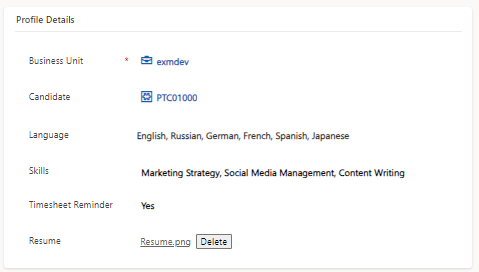
Field | Description |
|---|---|
Business Unit | Specific division or department within a company where the user works. |
Candidate | Individual applying for a job within an organization. |
Language | Languages spoken or understood by the user. |
Skills | Abilities, proficiencies, and expertise possessed by the user. |
Timesheet Reminder | Option to receive reminders for not submitting the timesheets. |
Resume | Professional summary, work experience, skills, etc., of the user. |
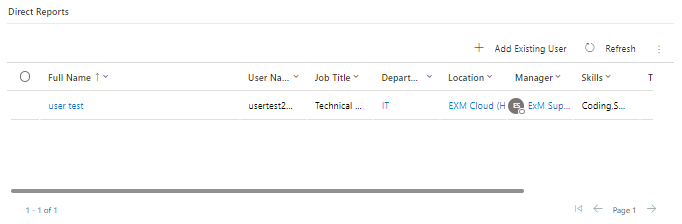
Direct Reports
Direct report typically refers to an individual who directly reports to another person within a hierarchical structure, usually in a workplace setting. It signifies an employee who is under the supervision or management of another individual, known as their manager.
Separation
The Separation section includes Submission Date, Employee Status, Reason for separation, Last Working Day, and Comments for record-keeping and exit procedures.

Field | Description |
|---|---|
Submission Date | The date when the separation process was initiated or when the separation request was received. |
Employee Status | The current status of the employee within the organization, indicating whether they are active, on leave, or in the process of separation. |
Reason for Separation | The specific reason or cause behind the employee's departure, which could range from voluntary resignations to terminations, retirements, or other circumstances. |
Last Working Day | The date specified as the employee's final day of work within the organization. |
Comments | Additional notes or comments relevant to the separation process, which may include details from exit interviews, outstanding tasks, handover responsibilities, or any other information deemed important for record-keeping and administrative purposes. |
Benefit
A benefit typically refers to a list of benefits associated with an individual or a group within an organization. It provides a comprehensive view of the benefits that employees are enrolled in or eligible for. Each benefit entry in the list usually contains detailed information about the benefit, such as its name, description, coverage details, enrollment status, and any associated costs or contributions.

Financial Details
Financial Details typically refer to a section within a user profile where various financial information about an individual is stored. This information might include details related to salary, compensation, bonuses, deductions, tax withholdings, and other financial aspects relevant to the individual's employment or financial relationship with the organization.

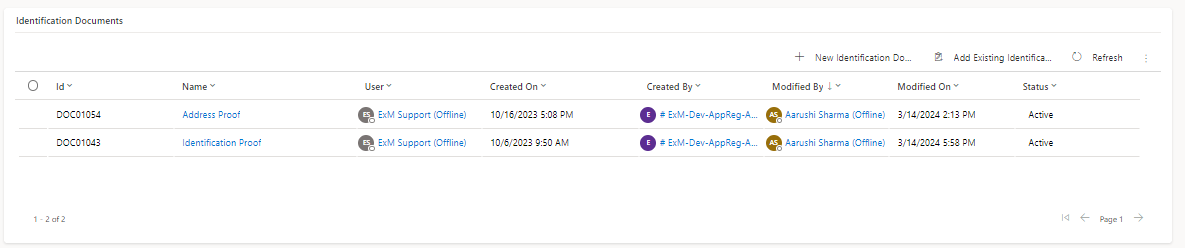
Identification
Identification typically refer to official documents used to establish a person's identity. In various contexts, especially within organizational systems, this section might include details or copies of documents such as passport, driver's license, national ID card, social security number, and birth certificate, used to verify an individual's identity within organizational systems.
Personal Details
Personal Details encompass key information such as Education, Previous Employment Details, and Dependent Information. This section provides a comprehensive overview of an individual's academic background, work history, and any dependents they may have, facilitating efficient management within organizational systems.
Education
This section includes details about an individual's academic qualifications, such as degrees earned, institutions attended, majors or fields of study, graduation dates, and any academic honors or distinctions. It provides insights into the individual's level of education and areas of expertise.
Previous Employment Details
Here, information about the individual's past work experiences is recorded, including the names of previous employers, job titles, dates of employment, responsibilities, achievements, and reasons for leaving. This section helps in understanding the individual's professional background, skills acquired, and career progression.
Dependent Information
This section contains details about any dependents that the individual may have, such as spouses, children, or other family members. It typically includes their names, dates of birth, relationship to the individual, and any relevant medical or financial information. This information is important for benefits administration, insurance coverage, and other family-related matters within the organization.
Verification Tab
Verification typically involves conducting background checks and drug tests to ensure the integrity and suitability of individuals for specific roles within an organization. These processes are commonly used during recruitment or promotion to verify the authenticity of information provided by candidates and to assess their fitness for the position.
Background checks
This process involves examining an individual's criminal record, employment history, education credentials, credit history, and other relevant background information. It helps employers verify the accuracy of the information provided by candidates and assess any potential risks associated with hiring them. Background checks are essential for maintaining a safe and secure work environment and mitigating legal and reputational risks for the organization.

Drug Test
Drug testing is conducted to detect the presence of illegal or controlled substances in an individual's system. It may involve analyzing urine, blood, saliva, or hair samples to screen for drugs such as marijuana, cocaine, opioids, amphetamines, and others. Drug testing is particularly common in industries where safety is paramount, such as transportation, healthcare, and manufacturing. It helps employers ensure that employees are not impaired by drugs while performing their duties, thereby minimizing the risk of accidents, injuries, or errors on the job.

Request
In a user form, a Request related list typically comprises items or requests made by the user within the system. These requests could vary depending on the purpose of the system but may include various types such as equipment requests, access requests, or any other requests relevant to the user's interaction with the organization.


