
Transfer orders move parts/assets between company stockrooms. A transfer order is a document that marks the transfer of inventory or parts/assets from one place to another within an organization in field service management. It is frequently utilized to complete service demands, restock supplies, or redistribute resources.
Transferring both consumable and non-consumable parts/assets is possible in the following ways:
A part/asset can be transferred and have a quantity larger than one if it is consumable.
A part/asset must be transferred as a single entity with a quantity of one if it is non-consumable.
General Tab
All the information related to the Transfer Order is present in this tab. An Admin can view/edit the fields and update the transfer order request.
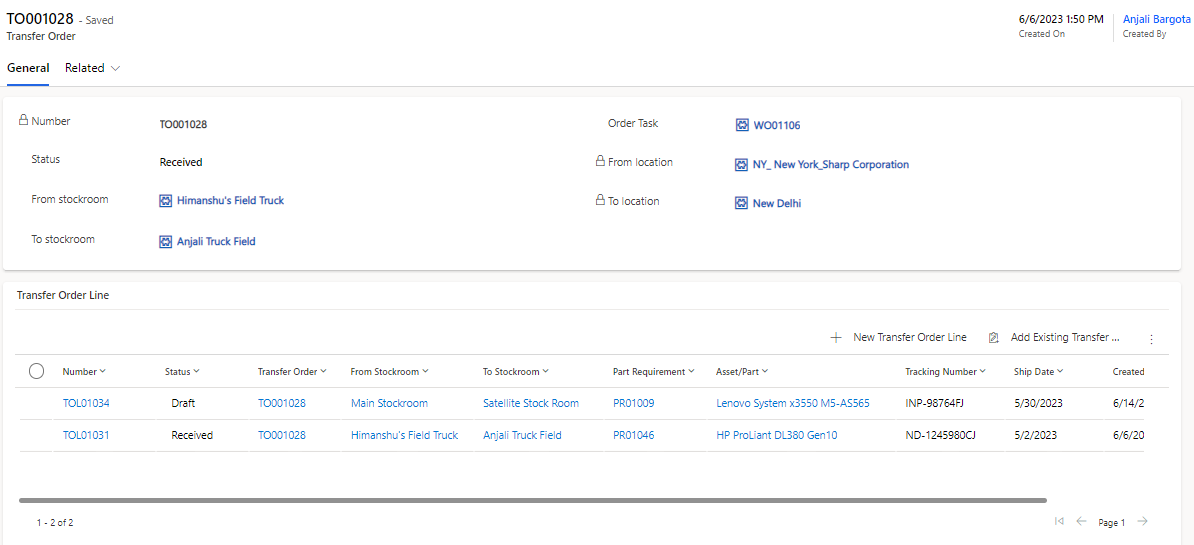
Field | Description |
|---|---|
Created By | User who created the transfer order request. |
Created On | Captures the date and time of transfer order registration. |
From Location | The stockroom location from where the transfer will be done. Note: This field is auto populated on the basis of selected From Stockroom field. |
From Stockroom | The stockroom from where the transfer will be done. |
Number | Unique auto-generated transfer order number. |
Order Task | The work order or work order task for which this transfer order request is created. |
Status | Status of the transfer order. Out of box choices are:
|
To Location | The stockroom location to which the transfer will be done. Note: This field is auto populated on the basis of selected To Stockroom field. |
To Stockroom | The stockroom to which the transfer will be done. |
Transfer Order Line
Multiple parts/assets may be transferred on a single transfer order using transfer order lines. Operations like shipment preparation can be carried out at the transfer order line level.
A transfer order may contain many transfer order lines, each of which specifies a different item, part, or asset along with the quantity.
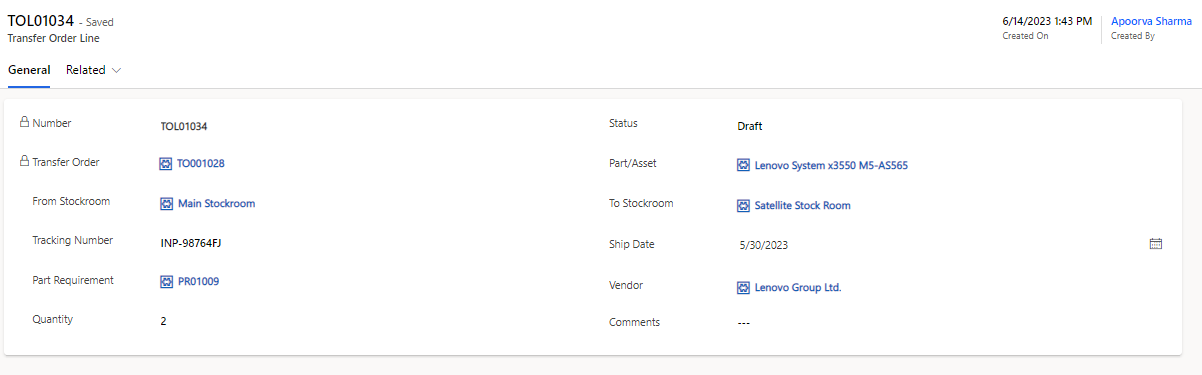
General Tab
Fields | Description |
|---|---|
Created By | User who created the transfer order line request. |
Created On | Captures the date and time of transfer order line registration. |
Comments | Comments can be added here if any. |
From Stockroom | The stockroom from where the transfer will be done. |
Number | Unique auto-generated transfer order number. |
Part/Asset | The part/asset that has to be transferred. |
Part Requirement | The corresponding part requirement if any. |
Quantity | The amount of part/asset that needs to be transferred. |
Ship Date | The date when the part/asset was shipped. |
Status | Status of the transfer order line. Out of box choices are:
|
To Stockroom | The stockroom to which the transfer will be done. |
Tracking Number | The tracking id of the transfer if any. |
Transfer Order | The parent transfer order of this transfer order line. |
Vendor | Vendor associated with the transfer. The lookup list shown only those companies designated as Vendor in their Type column. |
Status Mapping
Transfer Order Status | Transfer Order Line Status |
|---|---|
Draft | When all transfer order lines are in Draft. |
Awaiting Fulfillment | When all transfer order lines are Awaiting Fulfillment. |
Partially Shipped | When at least one of the transfer order lines is Shipped. |
Shipped | When all transfer order lines are Shipped. |
In Transit | When all transfer order lines are In Transit. |
Received | When all transfer order lines are Received. |
Canceled | When all transfer order lines are Canceled. |
Example Illustration
The source location (where the inventory is being taken from), the destination location (where the inventory is being delivered to), and other details are included in a transfer order. Contrarily, transfer order lines represent the particular items or parts/assets that are being transferred within a transfer order.
Consider that you operate a business that offers upkeep for electrical gadgets, and that you have two warehouses:
Warehouse A and Warehouse B.
While Warehouse B is running low on replacement parts, Warehouse A has a plenty of them.
You start a transfer order from Warehouse A to Warehouse B to correct this inventory imbalance.
The following is detailed in the Transfer Order:
Field | Value |
|---|---|
Number | TO001 |
From Stockroom | Warehouse A |
To Stockroom | Warehouse B |
The following is detailed in the Transfer Order Lines:
Number | Item | Quantity |
|---|---|---|
TOL001 | Circuit Board XYZ | 20 |
TOL002 | Power Supply Unit ABC | 10 |
TOL003 | Display Panel PQR | 15 |
The transfer order (TO001) is created in this example to transfer spare components from Warehouse A to Warehouse B. The transfer order lines list the particular parts/assets that are being transferred and their corresponding quantities. In this instance, 15 Display Panel PQR units, 10 Power Supply Unit ABC units, and 20 Circuit Board XYZ units are all being relocated.
The inventory will be physically moved from Warehouse A to Warehouse B once the transfer order has been created and processed. This makes sure that there are enough spare parts/assets in Warehouse B and that the extra stock in Warehouse A is used effectively.
