
Create Work Order
Navigate to Field Service Management > Active Work Order in the left navigator.
Click on the button on the top ribbon of the view.

The new work order form will open.
Required Fields:
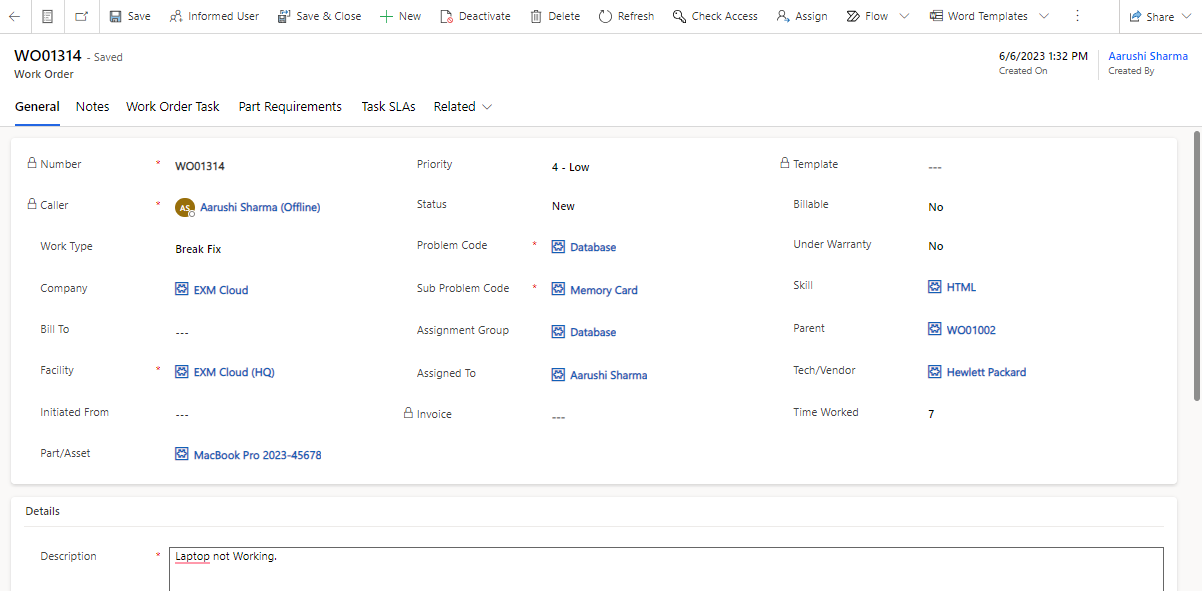
Caller, Problem Code, Sub Problem Code, Facility and Description
Pre-Filled Fields:
Number, Caller, Status, Billable and Under Warranty
Click on the  button on the top ribbon.
On successful submission, you will be redirected to the screen where your Work Order Number is generated automatically, Created On date is captured along with the details of work order is provided.
Was this page helpful?
IT Service Management (ITSM)
Human Resource Service Delivery (HRSD)
Customer Service Management (CSM)
Powered By
