
The Company Table usually includes details on the names of the companies, their contact information, business address, phone number, E-Mail address and other relevant contact information.
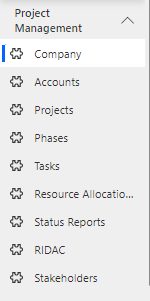
Navigate to Project Management > Company in the left navigator.
Click on the  button on the top ribbon of the view. A form will appear, fill the required details and save the form.
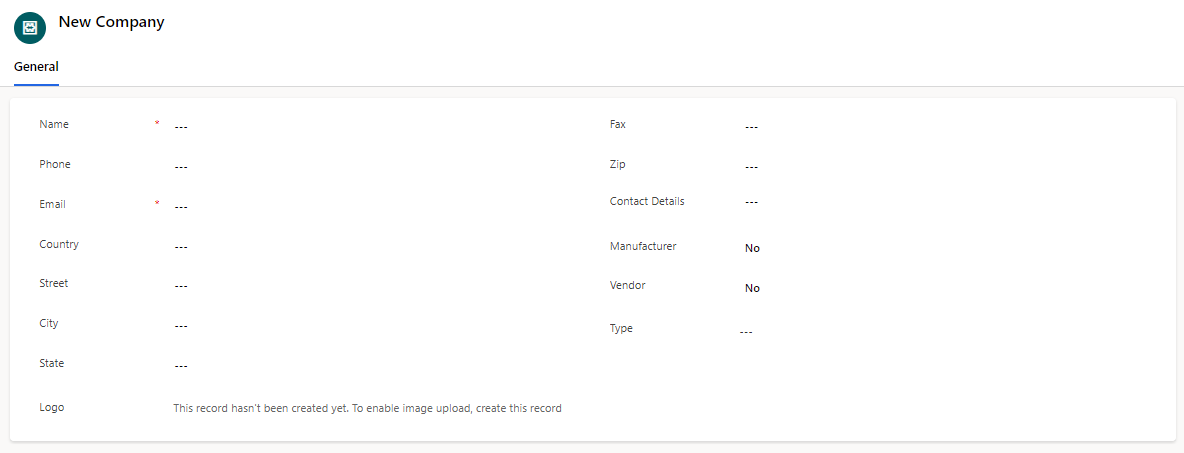
Fields | Description |
|---|---|
Name | The name or title of the company |
Phone | The phone number of the primary contact person or representative |
The email address of the primary contact person or representative | |
Country | The country where the company is located |
Street | The street address or location of the company. |
City | The city where the company is situated. |
State | The state or province where the company is located, if applicable. |
Logo | A visual representation or logo associated with the company |
Fax | The fax number associated with the company, if applicable |
ZIP | The ZIP or postal code of the company's location |
Contacts Detail | The name of the primary contact person or representative for the company. |
Manufacturer | Indicates if the company is a manufacturer involved in the project |
Vendor | Indicates if the company is a vendor or supplier for the project |
Type | The categorization or type of the company (Vendor, Partner, Customer) |
