
A status report, organized form used in project management, provides an overview of a project's vital signs, progress, and current status. In order to keep team members and other significant parties informed about the project's performance and advancement in respect to its objectives and milestones, it is an essential communication tool.
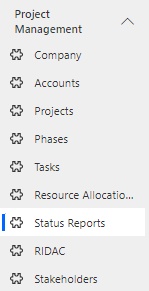
Navigate to Project Management > Status Reports in the left navigator.
Click on  button on the top ribbon of the view. A form will appear, fill the required details and save the form.

Fields | Description |
|---|---|
Date | The date when the status report is generated or submitted |
Project Status | Define the Project Status(Red, Amber and Green) |
Resource Status | Information about the current state of resources |
Cost Status | An overview of the project's financial performance |
Project | The specific project to which the status report pertains, providing context for the report's contents. |
Schedule Status | Details about the project's timeline and schedule |
Scope Status | Information about the project's scope, any changes or deviations |
Project Summary | A concise summary of the project's current state, progress |
Accomplishments | A list of achievements or milestones that have been reached since the last report. |
Planned Activities | A list of activities or tasks that were planned for the reporting period and their current status. |
Resource Summary | A summary of resource allocation, availability, and any resource-related challenges. |
Cost Summary | A summary of project costs, including expenditures, budget adjustments, and any cost-saving measures. |
Schedule Summary | An overview of the project schedule, including progress, delays, and adjustments made to the timeline |
Scope Summary | Define the summary of the project scope |
